The LIVOLO EC 16 A smart plug turns an ordinary electrical appliance into part of your smart home. It allows you to switch connected equipment on and off from your smartphone, schedule its operation, create automation scenarios, and monitor its current power consumption.
A LIVOLO EC Gateway, sold separately, is required for control via the LIVOLO app.
Where and how it is used
The smart plug connects directly to a standard European 230 V wall socket. The required electrical appliance is then plugged into it.
Suitable for controlling:
-
table lamps and decorative lighting;
-
fans and humidifiers;
-
routers and network equipment;
-
TVs and multimedia equipment;
-
chargers;
-
coffee makers and other household appliances with a load of up to 16 A.
For automatic switching, the appliance must be capable of resuming operation automatically when power is restored.
What it helps you do
The smart plug allows you to remotely check and switch off an appliance that was left on, automate everyday tasks, and avoid unnecessary electricity consumption.
In the app, you can:
-
remotely switch the plug on and off;
-
set an operating schedule;
-
add the plug to LIVOLO automation scenarios;
-
view the current power consumption of the connected equipment;
-
use the power level as a condition for automation.
The plug can also be controlled using the button on its housing, so a smartphone is not required for normal manual switching.
Automation examples
-
Automatically switch decorative lighting on in the evening and off before bedtime.
-
Switch off chargers and office equipment at night.
-
Switch on decorative lighting.
-
Detect when an appliance has finished operating based on a decrease in power consumption and launch the required scenario.
-
Limit the operating time of a fan, humidifier, or other household appliance.
As a result, routine tasks are performed automatically, appliances do not operate unnecessarily, and they can be controlled from any convenient location.
Power measurement
The plug displays the current power consumption of the connected appliance in the app. The data can be refreshed manually, and a specified power value can be used as an automation condition.
When power consumption rises above or falls below the set threshold, the system can perform a specified action or launch a scenario. The measurement error does not exceed 2%.
Status indication
A light indicator is built into the button:
Connecting to the LIVOLO app
-
Connect and configure the LIVOLO EC Gateway.
-
Open the devices section in the LIVOLO app.
-
Tap «+» and select EU Socket.
-
Press and hold the button on the plug for approximately 5 seconds.
-
When the indicator starts flashing, release the button and tap «Next» in the app.
-
Wait for the connection to be completed, name the plug, and select a room.
To remove the device, use the app or press and hold the button for 10 seconds until you hear two beeps, then release it.
Control using an EC remote
The plug can also be paired directly with a compatible LIVOLO EC remote without using the app. To do this, press and hold the button for 5 seconds until you hear a beep and the red and blue indicators begin flashing alternately. Then press the required button on the remote.
Up to 8 remote-control codes can be paired. Please note: when the plug is connected to the EC Gateway, any previously paired remotes are disconnected. Control via the gateway and direct control using a remote cannot be used simultaneously.
Technical specifications
Specification
|
Value
|
| Type |
Smart plug adapter |
| Socket standard |
European |
| Supply voltage |
100–250 V AC |
| Frequency |
50/60 Hz |
| Maximum current |
16 A |
| Control protocol |
LIVOLO EC |
| Smartphone control |
Via the LIVOLO EC Gateway |
| Manual control |
Button on the housing |
| Remote-control pairing |
Up to 8 codes |
| Power measurement |
Yes |
| Measurement error |
No more than 2% |
| Zero-cross switching |
Yes |
| Power-loss recovery |
Yes |
| Switching life |
50,000 cycles |
| Safety shutters |
Yes |
| Housing material |
Flame-retardant plastic |
| Protection rating |
IP20 |
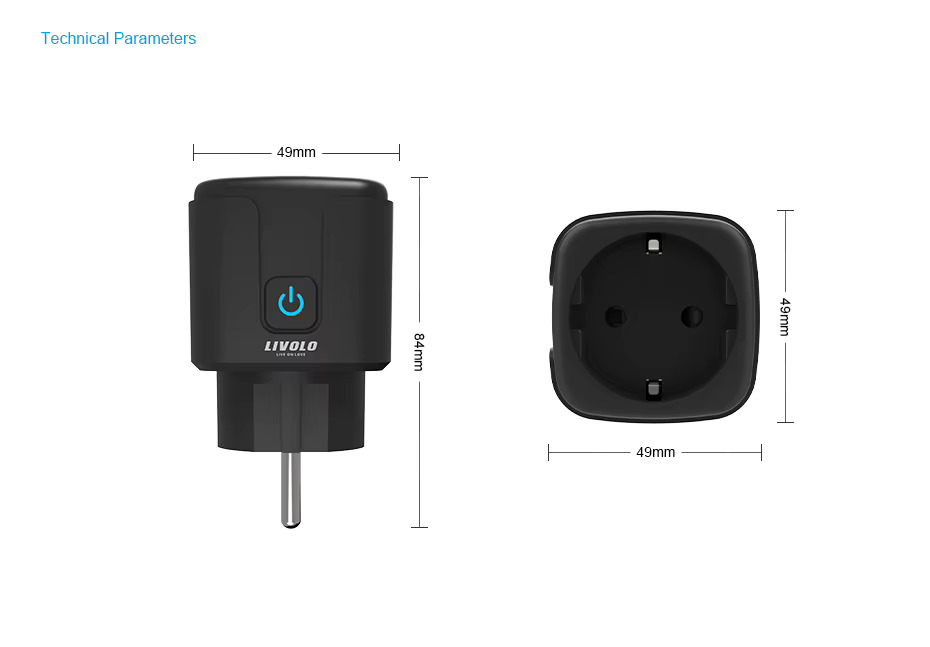
| Housing dimensions |
49 × 49 mm |
| Overall length including pins |
84 mm |
| Place of use |
Indoors in dry areas |
Do not exceed a load of 16 A and do not use the plug to automatically start equipment that the manufacturer prohibits from being left unattended.
\Marketing)









 Pickup from the branch from UAH 70
 Delivery to the post office from UAH 50
 Courier to the address from UAH 100
 Pickup from the branch from UAH 30


 Online by Visa or Mastercard
 Payment by parts PrivatBank
 Hire Purchase monobank
 Payment by IBAN details
 Payment upon receipt
 Warranty - 5 years
 Returns within 14 days
 Exchange within 30 days
 Accumulative discount