LIVOLO EC 1-Channel Smart Lighting Relay — Smartphone Control
Already settled into bed but forgot to turn off the light? Left the hallway light on and remembered just as you were leaving home? The LIVOLO EC 1-channel smart relay lets you control lighting from your smartphone, set automatic switch-off, and keep using your familiar wall switch. One compact relay adds convenience you will appreciate every day.
The relay fits inside the wall box behind a mechanical switch, turning it into a smart switch. There is no need to change your switch design or your family’s habits: the switch works as before, while you gain additional control options through the LIVOLO HOME app.
Control a Single Light Fixture or a Group of Lights
The single-channel relay controls one light fixture or a group of lights that switch on and off together. It is suitable for a living room chandelier, bedroom ceiling lights, hallway lighting, or decorative lighting.
Control the lights through the app without getting up from the sofa or bed. The wall switch remains convenient for family members and guests — there is no need to reach for a phone every time.
A compatible LIVOLO EC gateway is required for smartphone control and automation setup.
Keep the Switches That Suit Your Interior
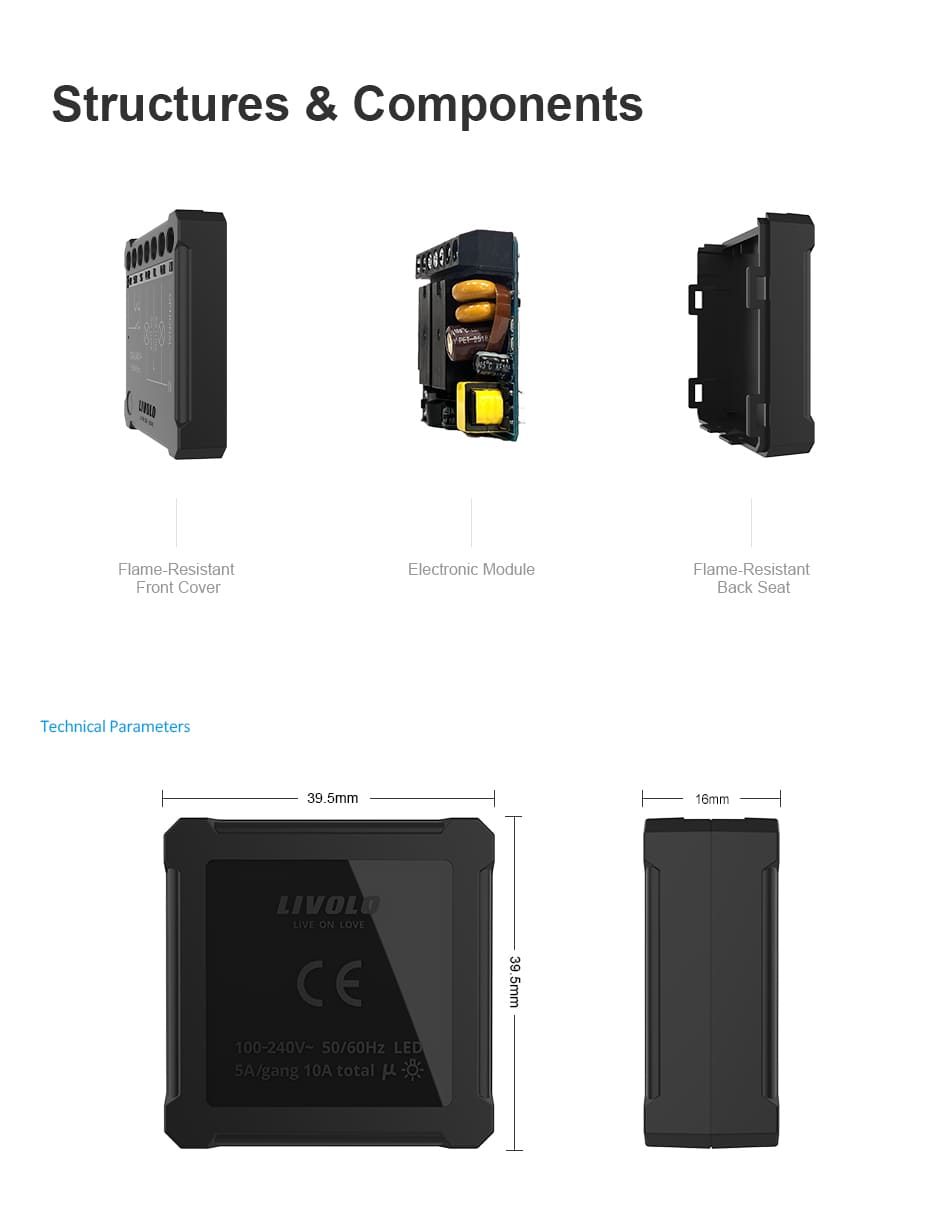
The relay is hidden inside the wall box, keeping your room’s appearance unchanged. It measures just 39.5 × 39.5 × 16 mm. Before installation, check that there is enough space behind the switch mechanism for the relay and wiring.
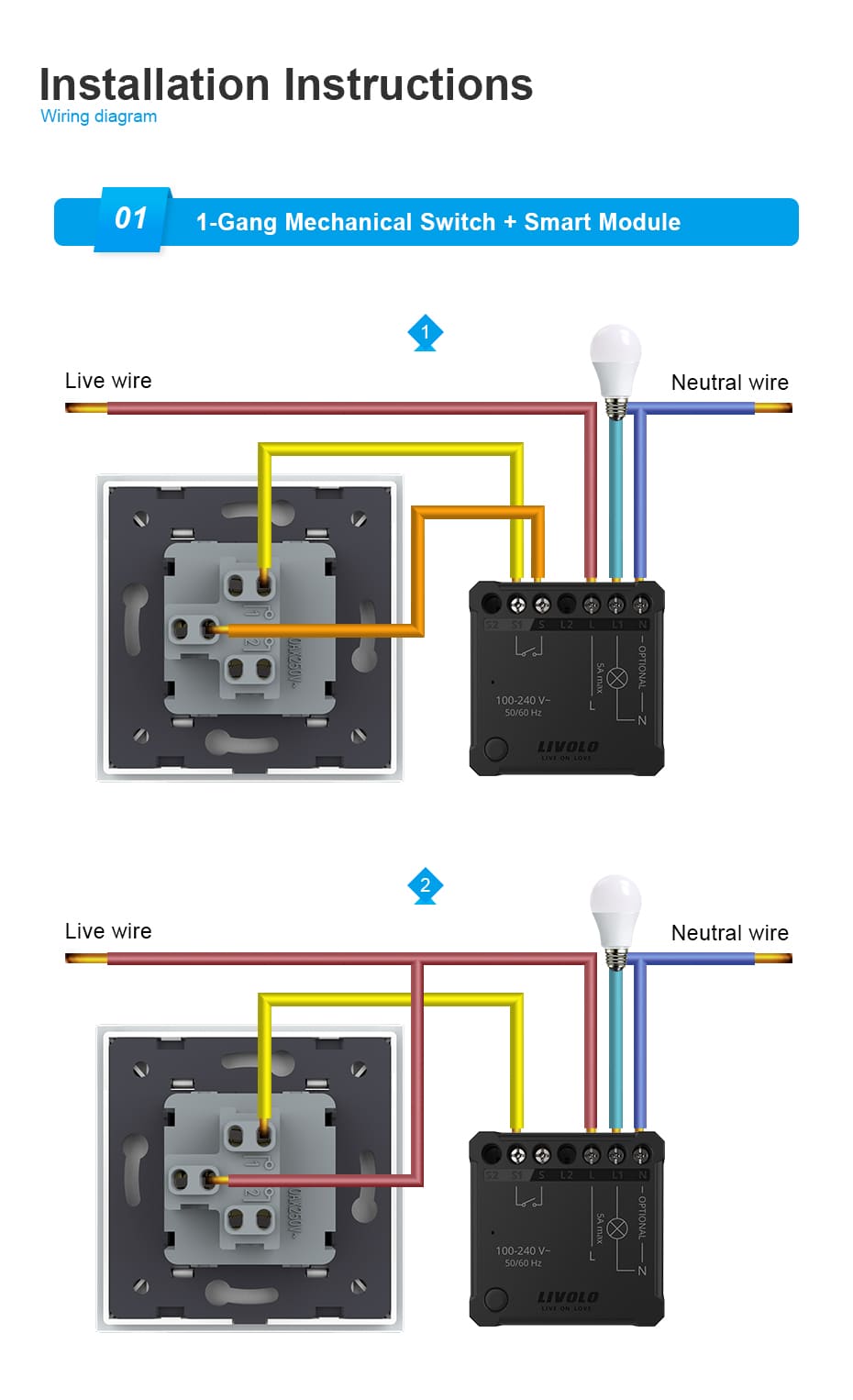
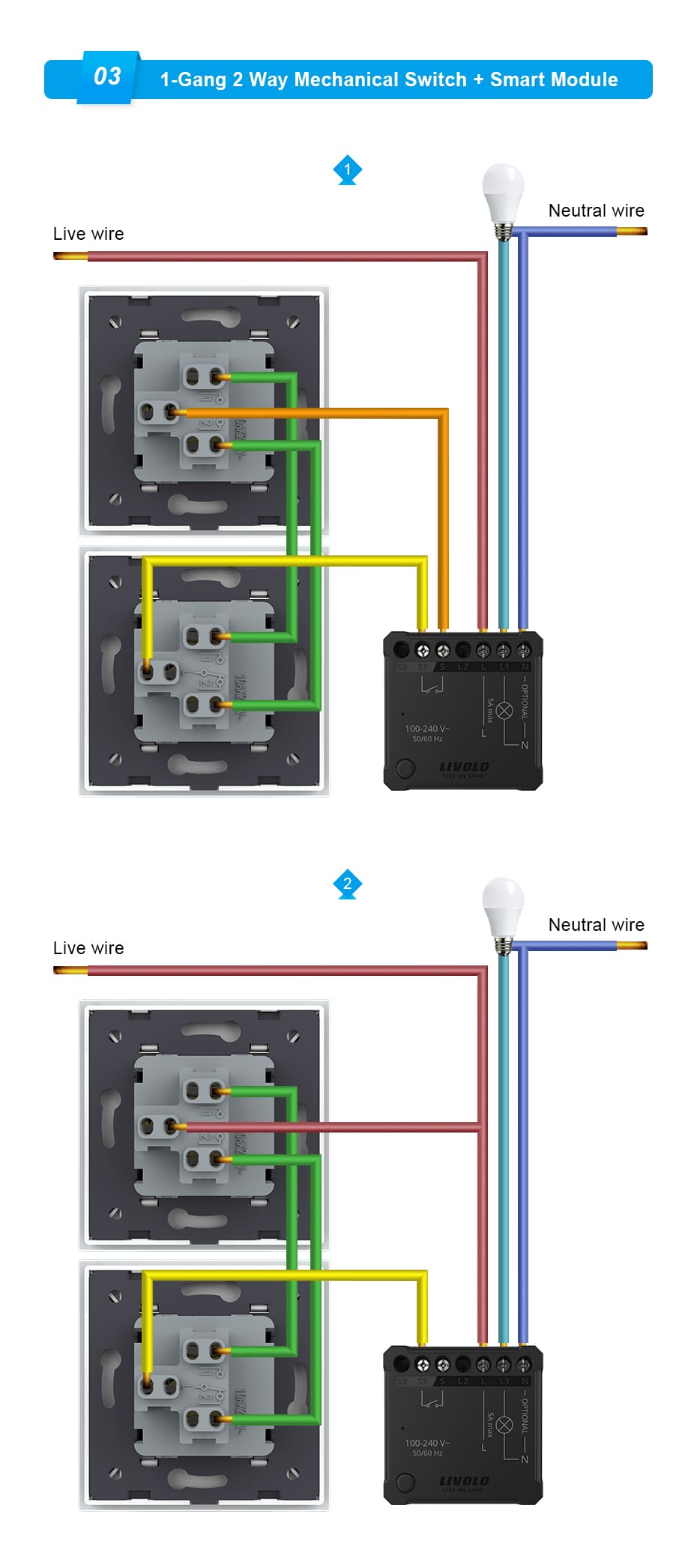
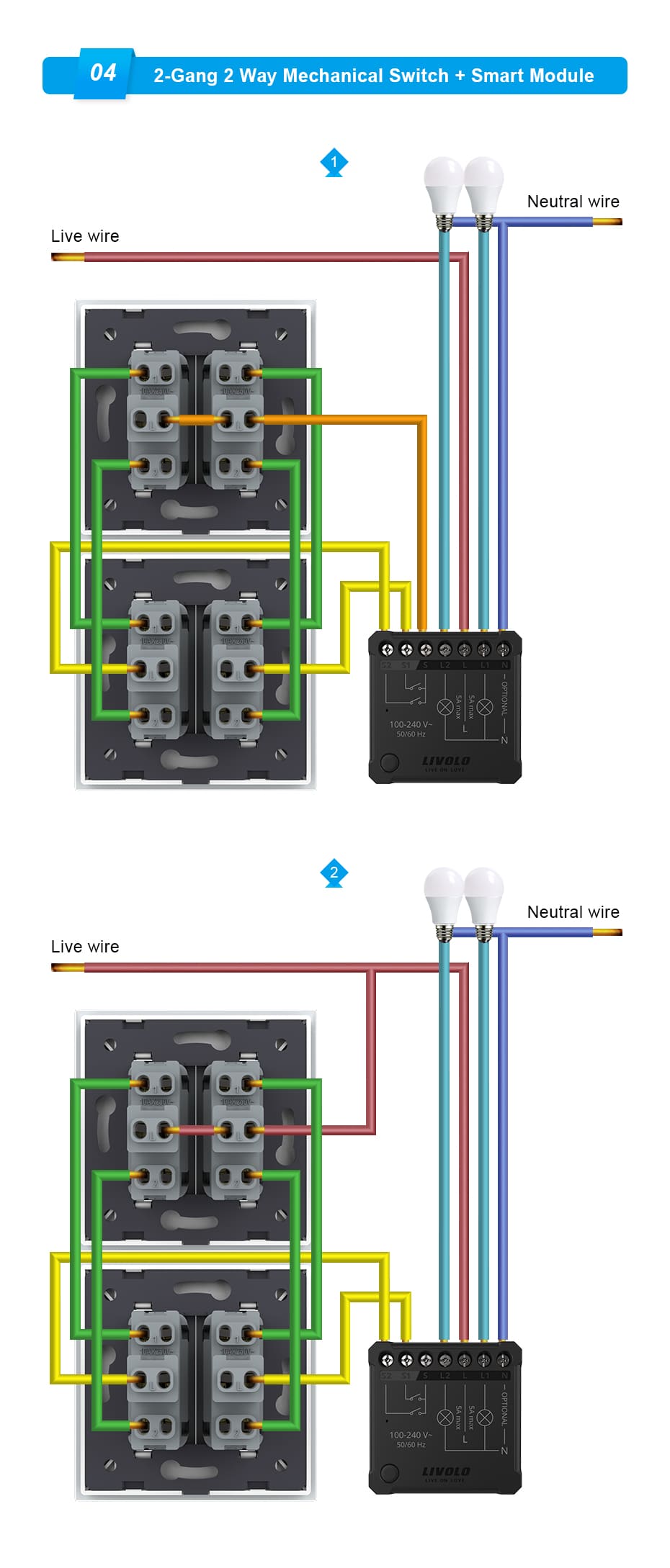
The device supports standard rocker switches and momentary push-button switches. It also supports wiring with two-way switches — a convenient solution for bedrooms, hallways, or staircases where lighting is controlled from two locations.
A Smart Relay That Can Operate Without a Neutral Wire
The LIVOLO EC relay supports installation without a neutral wire. This is convenient when upgrading lighting in a home where no neutral wire is available in the wall box: you can add smart control to your existing switch.
If a lamp flickers or glows faintly when switched off, the manual recommends connecting the neutral wire N.
Automatic Light Switch-Off with a Configurable Delay
For spaces where lighting is needed only briefly, the relay offers an automatic switch-off delay mode. In the app, you can choose 15, 45, or 90 seconds, or set a custom delay.
- In the hallway: press the switch and walk through comfortably — the light turns off when the countdown ends.
- In a pantry or walk-in wardrobe: take what you need and leave — the light will not stay on for long.
- On the stairs: set a delay that gives you enough time to walk through the illuminated area comfortably.
In this mode, pressing the switch again restarts the countdown instead of turning off the light, giving you extra time. Fewer unnecessary actions and less electricity spent lighting an empty room.
Lighting Scenes and Automation in LIVOLO HOME
Through LIVOLO HOME, you can include the relay in smart home scenes and automations. For example, schedule the lights to turn off at a specific time or add them to a “Leaving Home” scene.
With compatible sensors and the appropriate settings, lighting can respond to other events — for example, turning on when a door opens. Let the system handle repetitive tasks and enjoy light when you need it.
Choose What Happens When Power Returns
In the app, you can set how the lighting behaves after a power outage:
- Restore the previous state — the lighting returns to the state it was in before the outage.
- Off — the lights remain off when power returns.
- On — the lights turn on when power is restored.
For example, select “Off” for the bedroom so the lights do not wake you in the middle of the night when power returns.
Remote Control Option
The relay supports direct pairing with a compatible LIVOLO remote control. This is convenient when you want to turn the lights on or off from the sofa or bed without a smartphone.
Direct remote control and gateway connection are alternative operating modes. Once the relay is paired with a gateway, its direct remote pairings are deleted. You can pair a remote again after unpairing the relay from the gateway.
How to Connect and Set Up the Smart Relay
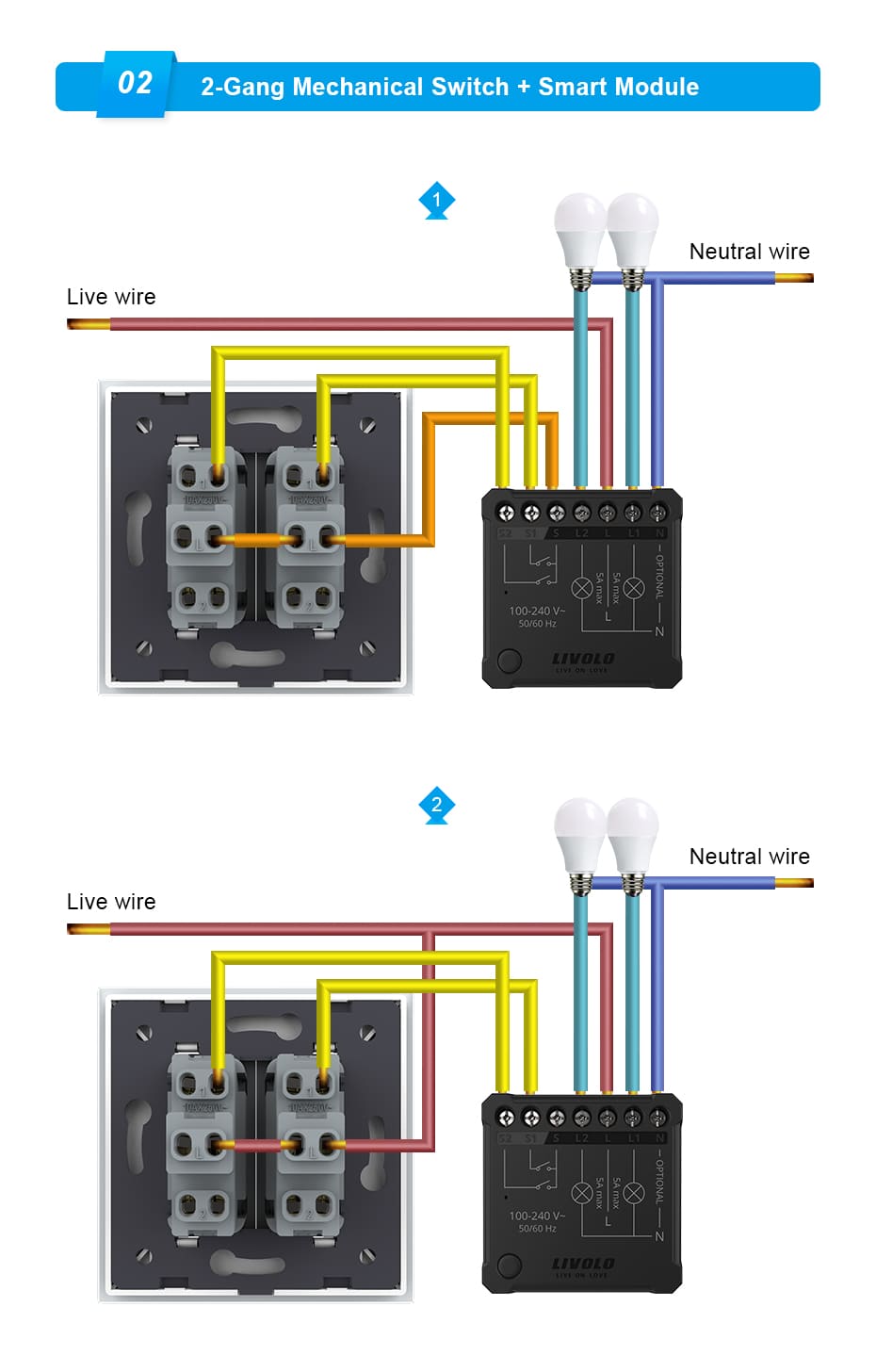
- Install the relay inside the wall box and connect it according to the wiring diagram for your switch type. Installation must only be carried out with the power disconnected.
- For smartphone control, install the LIVOLO HOME app and add a compatible EC gateway.
- In the app, tap “+” and select the single-channel Smart Switch Control Module.
- Press and hold the relay button for approximately 5 seconds until you hear a beep and the indicator starts flashing. Follow the app instructions to complete pairing.
- Give the device a clear name, such as “Bedroom Light” or “Hallway Lighting”, and configure the functions you need.
Technical Specifications
| Parameter |
Value |
| Brand |
LIVOLO |
| Device type |
Smart lighting control relay |
| Number of channels |
1 |
| Power supply |
100–240 V AC, 50/60 Hz |
| Maximum load |
5 A |
| Minimum load |
5 W |
| Communication protocol |
EC — LIVOLO’s proprietary protocol |
| App |
LIVOLO HOME |
| Gateway for app control |
A compatible LIVOLO EC gateway is required |
| Neutral connection |
Optional; recommended if lamps flicker or glow faintly when switched off |
| Dimensions |
39.5 × 39.5 × 16 mm |
| Indicators |
LED and audible signal |
| Operating temperature |
−10 to +40 °C |
| Rated lifespan |
100,000 cycles |
| Housing |
Flame-retardant material |
Your familiar switch and greater comfort every day. The LIVOLO EC 1-channel smart relay lets you control lighting from a convenient location, automate its operation, and avoid unnecessary trips back to the switch.








 Pickup from the branch from UAH 70
 Delivery to the post office from UAH 50
 Courier to the address from UAH 100
 Pickup from the branch from UAH 30


 Online by Visa or Mastercard
 Payment by parts PrivatBank
 Hire Purchase monobank
 Payment by IBAN details
 Payment upon receipt
 Warranty - 5 years
 Returns within 14 days
 Exchange within 30 days
 Accumulative discount