
Livolo touch pass-through switches can be installed on the existing wiring for key switches without making changes to the wiring! There is no need to open distribution boxes.
The Livolo touch pass-through switch is universal, it is also called a cross or stair switch and is used to control lighting from two or more locations. It works in on/off mode.
Attention! The touch pass-through switch does not work in conjunction with a mechanical pass-through switch.
The load is controlled by the Main (Master) switch, and the Secondary (Slave) switches send the on/off command to the Main switch.
For connecting the Main (Master) switch, the following terminals are used: Lin - phase, L1 and L2 - output to the load lines, COM - information. For connecting the Secondary (Slave) switch, two terminals are used: Lin - phase, COM - information.
Attention! The pass-through switch function starts working only after programming. Without programming, only the Main (Master) switch will turn the light on and off.
Programming:
Step 1: Touch the sensor of the Main switch and hold your finger until you hear a beep (approximately 4-5 seconds). Release your finger from the sensor area.
Step 2: Touch the sensor of the Secondary switch for half a second.
Resetting the programming:
Touch the sensor of the Main switch and hold your finger until the second beep (approximately 10 seconds). The programming will be reset.
Connection diagram for Livolo touch pass-through switches for controlling lighting from two locations:
Single-touch models: VL-C701S, VL-C701SR, VL-C701SZ*, VL-C701SQ*.
Double-touch models: VL-C702S, VL-C702SR, VL-C702SZ*, VL-C702SQ*.


Connection diagram for Livolo touch pass-through switches for controlling lighting from three locations:


Connection diagram for Livolo touch pass-through switches for controlling lighting from four locations:


Features
* Smart switches VL-C701SZ or VL-C702SZ are installed only in the place of the Main (Master) switch. Secondary (Slave) switches used are VL-C701S or VL-C702S.
* Smart switches VL-C701SZ or VL-C702SZ must be connected to the Smart Home Control Center Zigbee 3.0 Livolo Gateway.
* The smart pass-through dimmer VL-FC1SD1Z-2G is installed only in the place of the Main (Master) switch. Secondary (Slave) switches used are VL-C701S or VL-C702S.
* Silent switches VL-C701SQ or VL-C702SQ are installed only in the place of the Main (Master) switch. Secondary (Slave) switches used are VL-C701S or VL-C702S.
Connection diagram for Livolo pass-through switches on wiring designed for key switches:
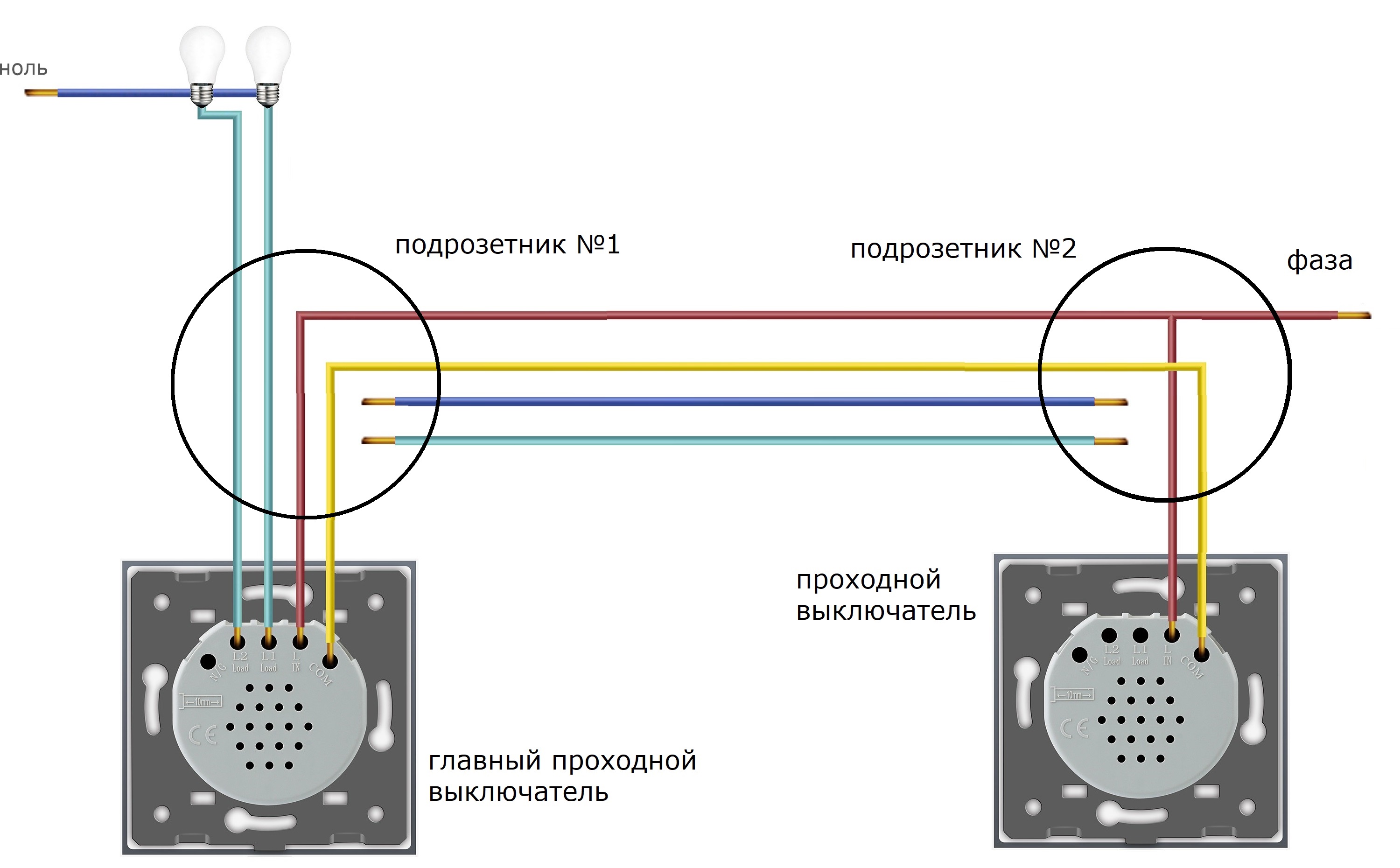
Existing wires are sufficient. There is no need to open distribution boxes. It is necessary to supply phase to both switches and connect them with the informational COM wire.

How to connect a Livolo touch pass-through switch to wiring designed for key switches
Example of implementing a scheme to control two light sources from two locations. It is necessary to supply phase to two switches and connect them with an informational COM wire. After connecting, there will be two free wires remaining.
Example of implementing lighting in a bedroom using LIVOLO touch switches.
TASK!
Implement control of the room's general lighting from three locations: left of the bed, right of the bed, and at the room entrance.
Implement control of individual wall lights on both sides of the bed.
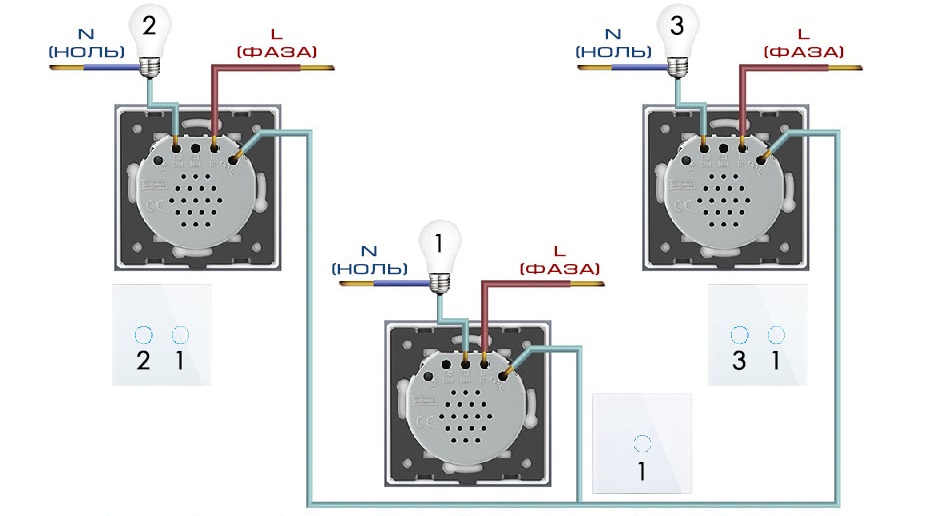
- Sensor #1 controls Lamp #1.
- Sensor #2 controls Lamp #2, and Sensor #1 (second one) controls Lamp #1.
- Sensor #3 controls Lamp #3, and Sensor #1 (second one) controls Lamp #1.
Overview video on connecting Livolo intermediate switches.
If you have any questions about connecting Livolo intermediate switches, we're happy to assist you. Here are our contact details https://livolo.in.ua/en/pages/contacts/